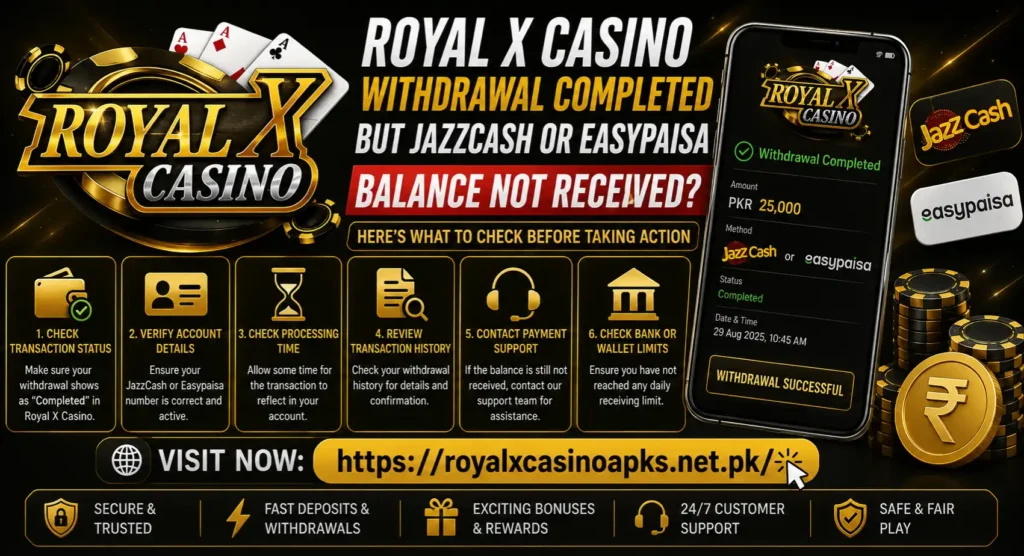
Royal X Casino Withdrawal Completed but JazzCash or Easypaisa Balance Not Received?
Royal X Casino marks your withdrawal as Completed, yet the expected amount is missing from JazzCash or Easypaisa. This is different from a request that still shows Pending or Processing. The app is indicating that its side of the request has moved to a final stage, but you still need to confirm whether the receiving wallet recorded the credit.
Do not submit another withdrawal just to test the system. Start by checking the recipient number, wallet transaction history and withdrawal reference. If the credit remains missing, report the same transaction to the platform and, when appropriate, the wallet provider.
Quick answer: Take screenshots of the completed withdrawal, note its request ID, amount and completion time, then open the actual JazzCash or Easypaisa transaction history. Confirm that the wallet number entered in Royal X Casino is correct and that the receiving account is active and within its current limits. If no incoming credit or reversal appears, ask Royal X Casino App support for the payout reference used for that completed request.
Completed Does Not Always Mean Visible in the Wallet
A withdrawal normally passes through more than one system. Royal X Casino records the request in its own transaction history, while JazzCash or Easypaisa maintains a separate record for the receiving account. A Completed label usually means the platform considers its withdrawal action finished. It does not, by itself, prove that the amount is visible in the correct wallet.
Several records may therefore exist for one withdrawal:
- The withdrawal request inside Royal X Casino
- The platform’s completion or payout record
- A payment-network reference
- The incoming transaction in JazzCash or Easypaisa
- A reversal record if the payment could not be credited
The aim is to match these records rather than repeatedly refreshing the balance.
First Identify the Exact Withdrawal Status
Open the Royal X Casino wallet or transaction-history section and read the status carefully. Take a screenshot before changing anything.
| Status shown | What it generally indicates | Appropriate next step |
| Pending | Request has not reached a final platform status | Follow the withdrawal pending checks |
| Processing | Request is still being handled | Keep the request ID and avoid submitting a duplicate |
| Completed | Platform records the request as finished | Match its payout reference with wallet history |
| Rejected | Request was not approved | Read the rejection reason before correcting details |
| Reversed or Refunded | Amount may have returned to the game wallet | Compare balances and transaction records |
| Cancelled | Request did not proceed | Check who cancelled it and whether the balance returned |
This article specifically deals with a Completed request for which no JazzCash or Easypaisa credit can be found.
Check the Actual Wallet Transaction History
An SMS notification can be delayed, filtered or missed. A push notification may also fail when background data is restricted. Neither notification is the final account record.
Open the official JazzCash or Easypaisa app yourself and review the transaction history. Check the period around the completion time, including transactions with unfamiliar sender or merchant descriptions. Compare the available balance with the balance before the withdrawal.
Do not rely only on:
- The phone’s notification panel
- A screenshot of an old wallet balance
- An SMS search using only “Royal X”
- A forwarded message claiming that payment was sent
- A balance figure displayed before the wallet refreshed
If the wallet app is temporarily unavailable, use only a verified access method offered by the wallet provider. Do not enter a wallet PIN on a website reached through a message or advertisement.
Confirm the Recipient Number Digit by Digit
Open the completed withdrawal details and compare the recipient number with the number registered to your active JazzCash or Easypaisa account. Check the final digits as well as the start of the number.
Common problems include:
- Two digits entered in the wrong order
- An old SIM number saved in the game account
- JazzCash selected while an Easypaisa number was intended
- A family member’s wallet left in the saved payment details
- A mobile number that is active for calls but not registered as the expected wallet
- Autofill restoring previously used account information
If the displayed number is masked, note the visible digits and ask support to confirm the masked destination. Do not post the full number in a public comment or Facebook group.
What if the number is wrong?
Do not submit another withdrawal or contact an unknown recipient directly. Save the completed record and report the incorrect destination through a checked support channel immediately. Ask for the transaction reference and whether the payout was credited, rejected or returned.
A completed transfer cannot be assumed recoverable. The available options depend on the actual payment status and the provider’s process.
Check Whether the Wallet Is Active and Accessible
Make sure you can open the receiving wallet normally. An inactive SIM, blocked account, incomplete account upgrade or unresolved identity issue can affect wallet access. The absence of a visible balance may sometimes be an account-access problem rather than a missing transfer.
Confirm that:
- The SIM associated with the wallet is active.
- The wallet app opens without an account restriction notice.
- You are viewing the correct account on a dual-SIM phone.
- The registered account holder details have not recently changed.
- You are not signed in to another wallet profile.
Never share the wallet PIN, OTP or password while checking account access. Easypaisa warns users not to disclose sensitive verification details, while JazzCash states that it will not ask for a PIN, OTP or password through suspicious calls or messages.
Review the Wallet’s Current Receiving and Balance Limits
Digital-wallet limits can differ by account type and verification level. They may apply to incoming credits, monthly turnover or the balance that can be held. Current limits should be checked inside the wallet or through the provider’s verified support because they can change.
JazzCash’s account terms state that transactions breaching credit, debit or account limits may be rejected and that applicable limits are communicated to customers. Easypaisa also publishes different limits for different account types. This means a number that worked previously may still encounter a limit later in the month.
Check:
- Current wallet balance
- Remaining incoming-credit capacity
- Monthly transaction usage
- Account or biometric-verification level
- Any limit or restriction notice in the wallet
Do not attempt to solve a possible limit problem by splitting or repeating withdrawals. First determine what happened to the completed transaction already recorded.
Compare the Amount Before and After Any Fees
Record the requested withdrawal amount and the amount the platform says it sent. If any fee or adjustment is displayed, save that information as well. Do not assume a fee exists when none is shown, and do not invent a percentage based on an older transaction.
Look through the receiving history for an amount that is slightly different from the requested total. At the same time, ask support to explain any deduction shown in the payout record.
The following should be matched:
| Record | Detail to compare |
| Royal X Casino request | Original requested amount |
| Completed-withdrawal detail | Final amount and completion time |
| Payout reference | Sender-side amount and identifier |
| JazzCash/Easypaisa history | Incoming amount, time and transaction ID |
| Game wallet | Deduction, return or reversal |
Refresh the Wallet Safely
Close the wallet app and reopen it through its normal icon. Check the internet connection and update the app through its recognized distribution channel if an update is available. A temporary display or synchronization problem can leave the home-screen balance behind the transaction record.
Avoid clearing wallet data, reinstalling the wallet app or resetting its PIN unless required by the provider’s own recovery process. Those steps may add an account-access problem without helping trace the payment.
Look for a Reversal in Both Accounts
A payout may be marked completed and later be returned when the receiving system cannot accept it. Check the Royal X Casino balance and transaction history for terms such as:
- Reversed
- Returned
- Refunded
- Failed after processing
- Balance adjustment
Also inspect JazzCash or Easypaisa history for an incoming entry followed by a reversal. A balance comparison alone can miss two transactions that cancel each other out.
If a reversal appears, save both entries. Do not immediately withdraw again until you know why the first destination could not receive the amount.
Obtain the Payout or Transaction Reference
The most useful evidence is a reference that can connect the platform’s completed status with the receiving wallet’s records. Names vary between systems, so it may be described as:
- Withdrawal request ID
- Payout ID
- Transaction ID
- Transfer reference
- Merchant reference
- Payment-network reference
Ask Royal X Casino support for the exact reference associated with your completed withdrawal. A screenshot saying “Completed” is useful, but a searchable transaction reference gives the wallet provider more information.
Do not accept an edited receipt or a plain text message as the only proof. Ask for information tied to the withdrawal record already visible in your account.
Report the Issue to Royal X Casino First
The sender or originating platform is normally best placed to confirm whether it initiated the payout and which destination and reference were used. Contact the support route shown inside the checked app or website.
Include:
- Account ID or username
- Registered number in masked form
- Withdrawal amount
- Request date and time
- Completion date and time
- Withdrawal request ID
- Selected wallet method
- Masked recipient number
- Screenshot of the completed status
- Screenshot of the wallet history with sensitive details hidden
Suggested message:
My Royal X Casino withdrawal shows Completed, but no matching credit appears in my JazzCash/Easypaisa transaction history. The withdrawal amount was PKR [amount], the request ID is [ID], and it was marked completed at [date and time]. The masked recipient number shown is [masked number]. Please confirm the destination and provide the payout or transaction reference used for this request.
Keep the support-ticket or complaint number. Do not start a new conversation every time; replies attached to one ticket are easier to trace.
Contact JazzCash or Easypaisa with the Reference
If Royal X Casino supplies a usable payout reference and confirms the destination, contact the relevant wallet provider through its official channel. Explain that an expected incoming payment is missing and provide the reference without revealing your PIN or OTP.
The officialJazzCash contact page lists its customer-support routes and explicitly warns users not to share a PIN, OTP or password. The officialEasypaisa contact page provides current helpline details for Telenor and other-network users.
Share only what is needed:
- Your wallet number through the provider’s private verified channel
- Expected amount
- Approximate transfer date and time
- Sender or merchant description, if known
- Payout or transaction reference
- Complaint number from the originating platform, if available
Ask for a wallet complaint number and keep it with the Royal X Casino ticket.
If the Wallet Provider Finds No Transaction
If JazzCash or Easypaisa cannot locate a transfer using the supplied reference, return to Royal X Casino support with the wallet complaint number. Ask the platform to verify whether the reference belongs to your withdrawal, whether the destination was correct and whether a reversal is expected.
Do not allow each side to send you back without a record. Keep a short timeline:
| Time | Event | Evidence |
| Request submitted | Withdrawal created | Request screenshot/ID |
| Status changed | Marked Completed | Completion screenshot |
| Wallet checked | No matching credit | Redacted history screenshot |
| Platform contacted | Payout reference requested | Ticket number |
| Wallet contacted | Transaction traced or not found | Complaint number |
This timeline is more useful than sending a long emotional message without identifiers.
Escalating an Unresolved Wallet Complaint
For the regulated wallet side of the issue, use the provider’s formal complaint process first. The State Bank of Pakistan’sSunwai portal is designed to route complaints concerning banks, microfinance banks and other financial institutions to the relevant forum. Its guidance explains that the financial institution is normally the first point of redressal.
Sunwai is not a shortcut for changing a Royal X Casino account status, and it cannot replace evidence that a payout was actually sent. Use it only for the financial-provider part of an unresolved complaint and follow the portal’s current instructions.
What Not to Do
- Do not submit a second withdrawal to “activate” the first one.
- Do not deposit more money to release a completed payout.
- Do not share a JazzCash or Easypaisa PIN.
- Do not forward an OTP to someone claiming to trace the payment.
- Do not install a remote-access or screen-sharing app for support.
- Do not post a complete phone number or receipt publicly.
- Do not edit screenshots or create a false transaction record.
- Do not contact numbers copied from random comments or chat groups.
- Do not assume that every missing SMS means the balance is missing.
- Do not delete the app before saving the request and payout records.
How This Differs from Withdrawal Pending
A pending withdrawal is still awaiting a final status inside Royal X Casino. A completed-but-not-received withdrawal has moved beyond that stage and now requires reconciliation between the platform record and the receiving wallet.
For a pending request, the main evidence is the request ID and waiting status. For a completed request, the key evidence is the payout reference, recipient number and absence of a matching wallet credit or reversal.
Do not publish or follow the same troubleshooting steps for both conditions. Start with the status actually shown.
How to Reduce Similar Problems Next Time
No precaution can guarantee that every payout will arrive without delay, but a few checks make later tracing easier:
- Review the wallet number before submitting.
- Confirm that the wallet belongs to the intended account holder.
- Check current wallet limits before requesting a larger amount.
- Take a screenshot of the confirmation page.
- Save the withdrawal request ID.
- Avoid changing the saved payment method during processing.
- Use one account and your own payment details.
- Keep app and wallet credentials private.
Frequently Asked Questions
Final Checklist Royal X Casino Withdrawal Completed
When a Royal X Casino withdrawal is completed but not received in JazzCash or Easypaisa, focus on records rather than repeated actions. Confirm the status, check the actual wallet history, verify the destination and limits, and look for a reversal. Then request the payout reference from Royal X Casino and use it when contacting the wallet provider.
Keep both complaint numbers until the transaction is located, returned or otherwise explained. Never pay an unlock fee, send another deposit or reveal an OTP or wallet PIN to speed up the process.
Royal X Casino involves real-money gaming and financial loss is possible. It should not be treated as employment, an investment or guaranteed income. This content is intended for adults aged 18 or over. Follow the laws applicable in your location and never gamble with borrowed money or funds needed for essential expenses.